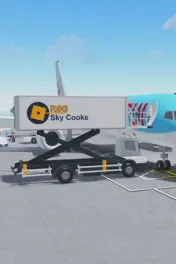
Cabin gear

Service carts

Four carts split by cabin and by food or drink.

Service carts in [πŸŽƒ]✈️ Cabin Crew Simulator

Service carts: Four carts split by cabin and by food or drink. Get it by Press F, then the cart key. Use it to Match the cart to the cabin. NPCs are reported to cover economy only.

What is Service carts?

Opened in serving mode. Z is economy food, X is economy drinks, C is business and first meals, V is business and first drinks.

Published facts

Service carts facts
FactValue
NameService carts
Obtain MethodPress F, then the cart key.
UsageMatch the cart to the cabin. NPCs are reported to cover economy only.

How do you get Service carts?

Press F, then the cart key.

How do you use Service carts?

Match the cart to the cabin. NPCs are reported to cover economy only.

FAQ

Service carts questions

What do you do in Cabin Crew Simulator?

You create an airline, board passengers, serve meals and drinks, handle cabin problems and emergencies, and earn Skybux for aircraft, airports, and customization. The live Roblox description is written by Cruising Studios.

Where do new codes get announced?

Cruising Studios uses the @CabinCrewRBLX account on X and the studio Discord. Codes also show up around visit milestones and seasonal updates. A code on this site is a reported string, not a guarantee it still redeems today.

What should a new player buy first?

Finish the Robloxia tutorial on the free RJ-145, redeem codes that still work, then unlock a cheap airport such as Los Angeles before saving for a larger aircraft. Widebody capacity matters more than buying every plane in order.